Once Human
About Once Human
Once Human is a multiplayer open-world survival game set in a mysterious post-apocalyptic future. Team up with friends to battle terrifying creatures, uncover hidden conspiracies, compete for resources, and build your own territory. Humanity has changed forever, and now you possess the power to reshape the world itself.
How to Change Worlds in Once Human
In Once Human, the teleporter system is the only way to switch between worlds.
Complete the introductory mission called “Eve of Evolution.”
Visit the first teleporter tower located in Deadsville.
Press the “G” key on your keyboard to interact with the teleporter.
A list of available worlds will appear, allowing you to switch servers or worlds easily.
Once Human Release Date
Once Human officially released on 9 July 2024 for PC platforms. The game is currently free to play on PC. Mobile, PlayStation 5, and Xbox versions are not yet available.
Players can follow the official social media channels and website for updates, events, and future platform announcements.
How to Play Once Human
Enter a chaotic world transformed by the catastrophic event known as Starfall. As a Meta-Human, you gain unique powers and abilities that help you survive against dangerous enemies and environmental threats.
Explore vast open-world environments, gather resources, build shelters, craft equipment, and fight against horrifying monsters while uncovering the secrets behind the apocalypse.
How to Top Up Once Human on BGSGamingStore
Select your preferred Crystgin or Pass denomination.
Enter your User ID, Region, and Server correctly.
Proceed to checkout.
Choose your preferred payment method.
Complete the payment process.
Once the payment is successful, the Once Human Crystgin or Pass will be credited to your account shortly.
How to Find Once Human User ID, Region, and Server
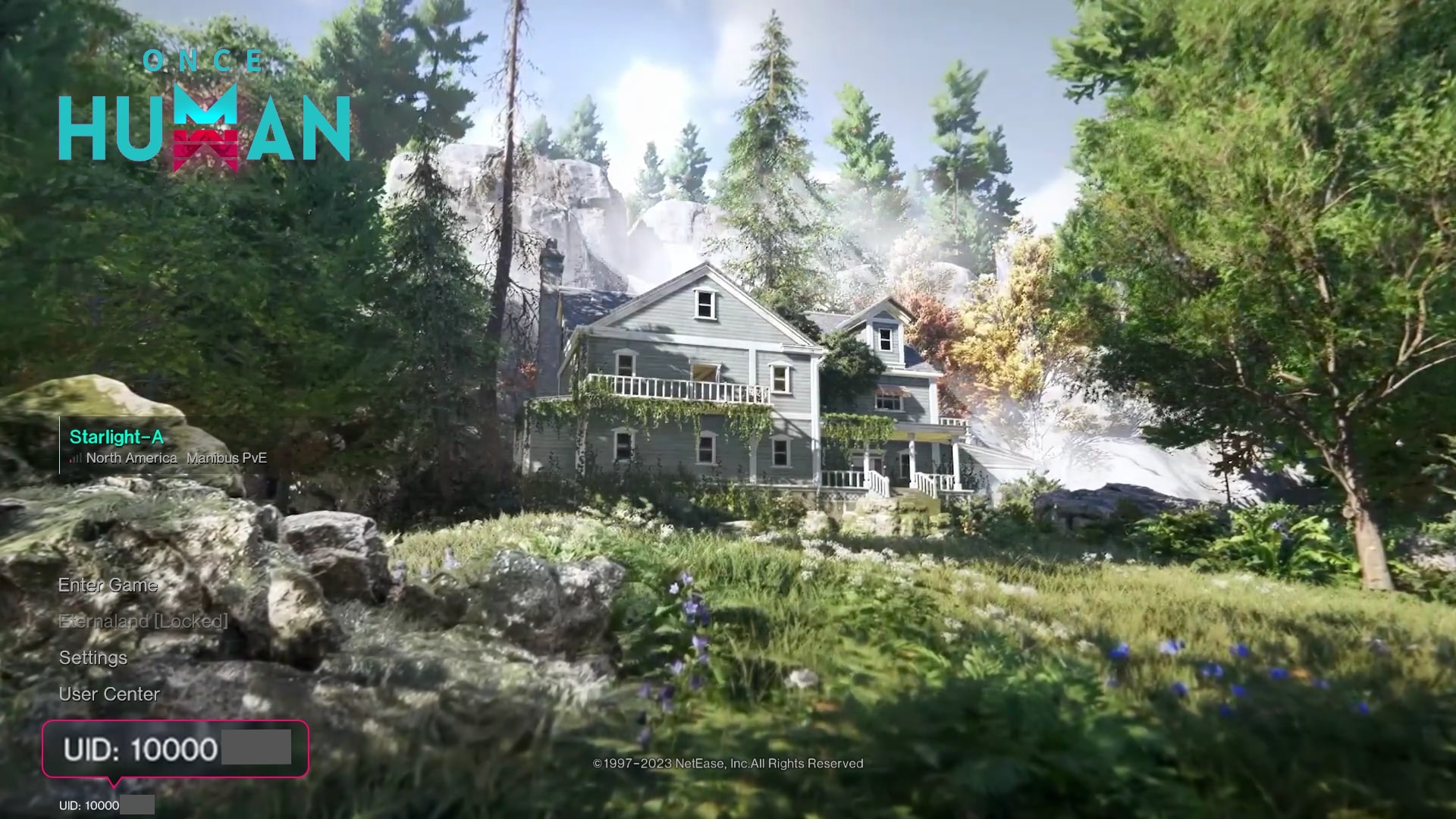
Log in to the game using your account.
On the main screen, your Region and Server information will be displayed.
Enter the game to view your User ID.
Why Choose BGSGamingStore for Once Human Top-Up?
Fast and Hassle-Free
Get your Once Human top-up quickly and easily with a smooth purchasing experience.
Flexible Payment Options
Choose from multiple secure and convenient payment methods.
Instant and Secure Delivery
Your purchase will be processed securely with fast delivery.
Reliable Customer Support
Our support team is available to assist you with any questions or issues regarding your order.
Exciting Promotions
Enjoy exclusive deals, offers, and gaming promotions available on BGSGamingStore.
User Reviews
Players praise Once Human for its immersive open-world gameplay, survival mechanics, unique monster designs, and engaging multiplayer experience. Many users enjoy the freedom to explore, build, and survive together with friends in a visually stunning post-apocalyptic environment.
Max quantity: 10
All purchases are non-refundable. Please double-check your Player ID before confirming.